One prompt,
your whole workspace.
Research, sites, sheets, docs, boards and carousels — how to use all 6 AI tools in one place, without hopping between apps.
Chapters in this guide
- 01 Quickstart →
- 02 Prompt Engineering →
- 03 What is Research? NEW →
- 04 How the AI builder works →
- 05 Who it's for →
- 06 Themes & color →
- 07 What you can build →
- 08 What is Sheets? NEW →
- 09 What is Docs? NEW →
- 10 What is Board? NEW →
- 11 What is CaroSpark? →
- 12 Presets & themes →
- 13 Growth loop →
- 14 Lead management →
- 15 What is a domain? →
- 16 Auto-connect →
- 17 Domain tools →
- 18 Plans →
- 19 Trust & Security →
- 20 FAQ →
First time? You'll have
a site live.
Preview without signing up. Pick a generation level, type one prompt, and a full multi-page site is built header to footer.
Pick a level, type one prompt
Choose a generation level — LabelWebs Lite (free), Standard or Max — then '분당 정자동 영어학원 만들어줘' and you're done. You can also pick the build mode: Standard or HTML-only.
AI builds header to footer
10+ sections placed automatically — header / hero / highlights / reviews / inquiry in one shot. Information-heavy industries split into multiple pages, and the palette is matched to the trade.
Edit, then publish
Edit by saying 'change the hero title', or freely on a Canva-style canvas. Free subdomain.labelwebs.com or your own .com, indexed within 24 hours.
"Homepage for a plastic pallet company in Gimhae — export, domestic and used lines, plus a quote inquiry board"
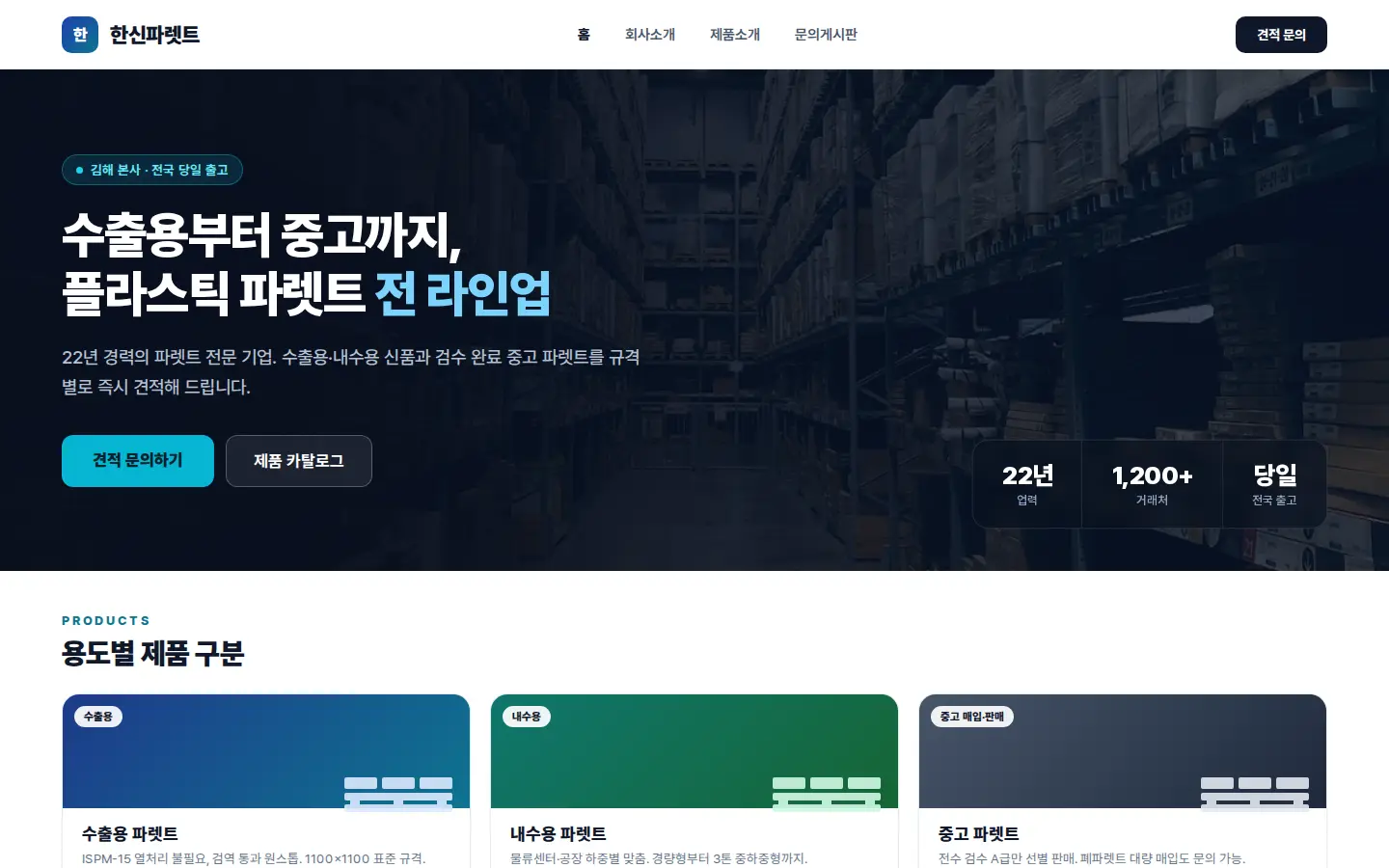
Example output generated from the single prompt above — swap in your own business name and industry.
Two core tools
Website Builder
AI build · Canva-style editing
AI builds a full multi-section site at once; refine it by chatting or directly on a Canva-style canvas (text, photos, elements, brand). Functional blocks like inquiry forms, maps and boards are wired in automatically.
CaroSpark
Instagram carousels
A 5-slide carousel in under 10 seconds. 5 structures (pain-point, story, before-after, tips, social proof) × 20 color tones. Download as 1080×1350 PNGs.
How one prompt
becomes a full site
Pick a generation level (Lite / Standard / Max) and a build mode (Standard / HTML-only), send a prompt, and the AI reads your intent and assembles a full multi-section site header to footer.
-
Three levels — LabelWebs Lite (free) · Standard · Max (Plus+). Higher levels add multi-page splitting and full design enhancement.
-
Two build modes — Standard (an easy-to-edit design canvas) and HTML-only (AI designs each section in code). In HTML-only, picking a higher model produces richer, more refined sections.
-
Functional blocks, automatically — inquiry forms, maps, notice boards, galleries, embeds and countdowns actually work once published.
-
Natural-language edits + Canva-style freedom — say 'change the hero title', or edit text, photos, elements, layers and brand colors yourself.
// AI-generated hero section
const HeroSection = () => {
  return (
    <section className="py-20 bg-white">
      <h1 className="text-5xl font-black">
        Bundang's #1 English academy — GlobalEnglish, Jeongja-dong
      </h1>
      <p className="mt-6 text-slate-500">
        Phonics specialists, classes of 6
      </p>
    </section>
  );
}
Look like a team when you're solo.
Freelancers, solo consultants, designers, writers. People who need portfolio + inbound on one page.
Freelance designer
- Portfolio grid
- Project detail pages
- Inquiry form + auto-reply
Solo consultant
- Experience & credentials section
- Service package cards
- Calendar-linked booking
Writer / creator
- Blog / archive
- Email signup form
- Social auto-link
Pages that bring calls, walks, and quotes.
9 SMB industries — pain points and section structures pulled from real owner interviews, not templates.
Demolition / Interior
- • Don't know where to put portfolio photos
- • Hard to show before / after
Before/After slider + gallery, auto-generated. Quote form, one-tap phone.
Cleaning / Home care
- • Not found in local search
- • Reviews scattered across platforms
Auto meta tags for location + service keywords. Review cards with rating widgets built in.
Academy / Education
- • Owner can't build a site themselves
- • Notice / gallery management is painful
Notice + gallery boards included. Optional parent login portal.
Clinics / Medical
- • Medical-ad compliance is tricky
- • Bookings / inquiries scattered
Compliance-aware copy guide. Booking form + KakaoTalk channel link.
Café / F&B
- • Menu only lives on Instagram
- • Hours / location inconsistent
Menu gallery + hours card. NAVER Map embed auto.
Legal / Tax
- • Hard to convey trust
- • Case results not organized
Credentials + case-results sections. Free-consult form with NDA notice.
Manufacturing / B2B
- • Factory exists, no sales page
- • Don't know where to show clients
Product / capacity sections. Client logo wall + quote form.
Lodging / Pension
- • Booking page too complex
- • Hard to show room photos
Room gallery + booking form. Location + amenity cards auto.
Other Local
- • No idea where to start
- • Spending too long on design choices
One prompt tailors it to your trade. Not sure where to start? Begin short and refine by chatting.
One prompt builds sites like these.
Here's exactly what you can build with prompts alone — the actual section structures shipped on real customer sites.
Landing Page
A single page funneled toward one goal: email, call, or sign-up. Perfect for product launches, events, and service intros.
Multi-page company / org site
A proper site with About, services, results and contact split across pages. Information-heavy trades — B2B, manufacturing, clinics, associations — split into multiple pages automatically.
Local shop / service
Neighborhood shops, contractors, academies, clinics — a single page focused on calls and inquiries. Free on the Lite level.
CaroSpark Carousels
Instagram 1080×1350 PNG carousels. 5 structures: pain-point, storytelling, before-after, tip series, social proof.
Specific prompts
produce specific sites.
Real prompts from real users, compared ❌ vague vs ✅ specific. Add 4 things — location, business name, contact, emphasis — and the result transforms.
"Make an English academy site"
"Build a homepage for GlobalEnglish Academy, 5F AK Plaza, Seohyeon-dong, Bundang. Phonics specialists for elementary, class of 6."
Location, business name, and strengths (phonics, small classes) tune the copy, meta tags, and header all at once.
"Cleaning company page"
"Suwon Yeongtong move-in cleaning specialists. 24-hour dispatch, quotes at 010-1234-5678. Lead with before/after photos."
Service type (move-in cleaning), differentiator (24h), phone, and emphasized section (before/after) get auto-placed in the right slots.
"Clinic page"
"Kim Dermatology — Gangnam Station Exit 12. Acne, melasma, scar laser specialists. Saturday hours. Use medical-ad compliant copy."
Compliance guide applies automatically. Hours and specialties land in header + hero.
"Café site"
"Seongsu-dong standalone first-floor bakery café 'OvenTime'. House sourdough and pour-over coffee. Weekday 8am–10pm."
Menu concept and location type drive gallery tone and hours card structure.
"Make me a law office site"
"Seocho-dong OO Legal Office. Inheritance & gift specialists, 22 years of practice, free first consult. Emphasize 3 case results."
Specialty + experience + trust signals (free consult) hit the copy instantly.
"Make my site cooler"
"Make the current hero more impactful: big headline, short subhead, single CTA button structure."
Edit prompts need where (hero) + how (impact) + structure (headline / sub / CTA) to land as intended.
Prompt checklist
- 01 Location — neighborhood, station, building
- 02 Business name — exact spelling
- 03 Strengths — 'specialist', 'small classes', etc. (1–2)
- 04 Contact — phone, KakaoTalk, or email (priority)
- 05 Tone — 'warm', 'trustworthy', 'young' (pick one)
Attach photos & files to pass real data
Use '+' next to the prompt to attach images, CSV, Excel, PDF or docs — the AI reads them and builds them into your site. Got materials? Hand them over instead of describing.
The right color for the right industry —
already chosen.
The AI reads your industry from the prompt and applies a fitting palette automatically. Don't like it? Change one color in the Brand tab and every section and page is repainted at once.
One-click recolor in the Brand tab
Pick a color in the builder's Brand tab and the whole site instantly unifies to that palette — or just ask in a prompt, like 'make it calmer'.
Just ask, and AI
scours the web for you
One keyword and AI crawls dozens of sites, distilling the essentials into a structured report — sources linked.
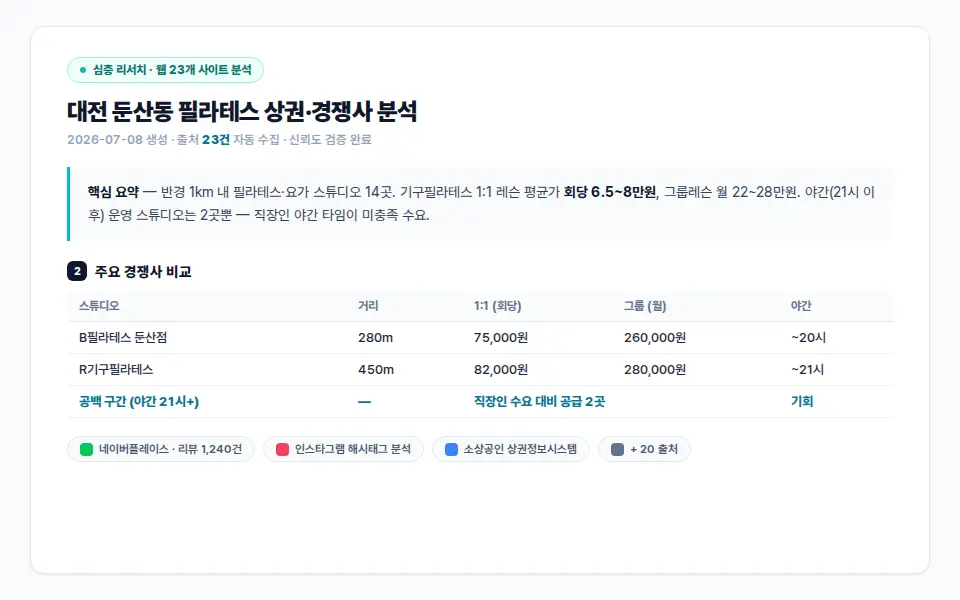
Ask a question
Describe the topic, competitor or market in one line.
AI browses the web
It crawls multiple pages, gathering and cross-checking facts.
Structured report
Organized into a report with a summary, tables and sources. Use 'Export to doc' to send it to the Docs tab as a new document — or append to an existing one — and keep refining.
Send a report to Docs and keep writing
Click 'Export to doc' at the bottom of a result and the report moves to the Docs tab — edit it freely or export to Google Docs.
Turn research
straight into a table
A spreadsheet AI fills in for you — market scans, lead lists, product catalogs. No Excel formulas — just select a range and ask.
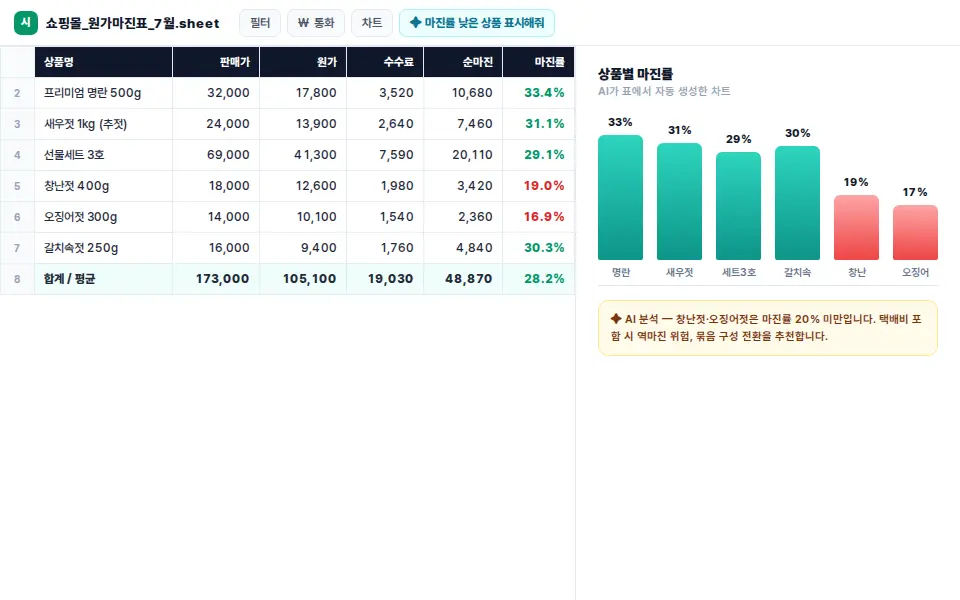
Describe the table
e.g. “Compare 30 Gangnam gyms by price and rating.”
AI researches & fills
The shared research engine gathers data and fills the table.
Refine a selection
No spreadsheet formulas needed — select the cells or range, say what you want, and the AI does it. Export the result to Google Sheets, CSV or Excel and keep editing there.
A business plan or proposal,
drafted for you
Reports, proposals and official letters, written automatically and grounded in research.
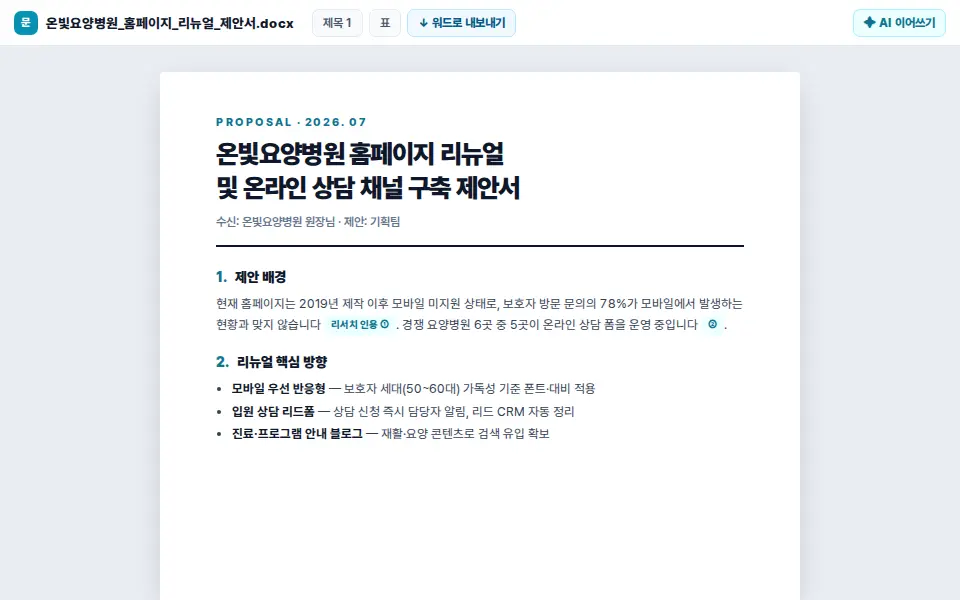
Pick a document type
Business plan, proposal, press release — set the goal.
Research-backed draft
It researches what it needs and writes a grounded draft.
Edit & export
Polish it however you like, then export to .docx or Google Docs and finish editing in the tools you already know.
Ideas, drawn
as diagrams at a glance
A whiteboard where AI draws your workflows and algorithms as diagrams.
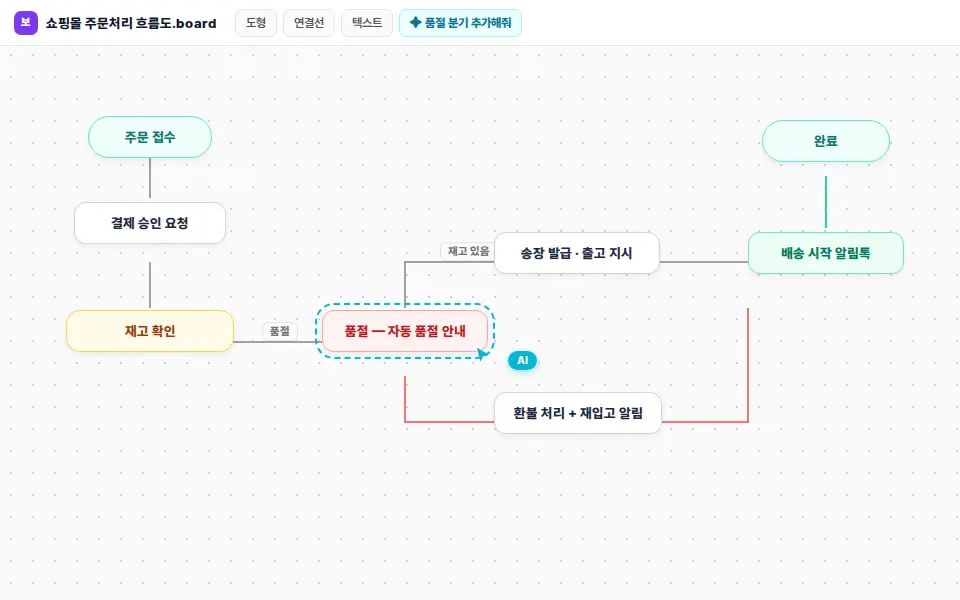
Describe the flow
Describe the process, structure or relationships in one line.
AI diagrams it
Backed by research, it generates flowcharts and diagrams.
Edit on the canvas
Move shapes and add notes to refine it together.
Your Instagram carousel,
built in one go — no design pain.
Pain-point, storytelling, before/after, tip series, social proof. Five Instagram-tested structures, generated automatically.
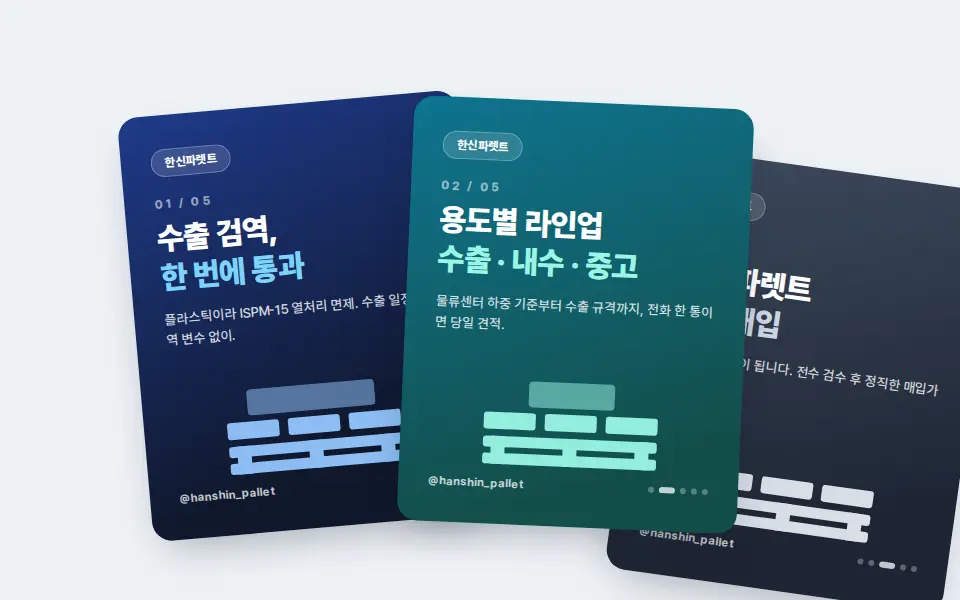
Pick topic + structure
Choose one of 5 presets: pain-point, storytelling, before/after, tip series, social proof. Or enter your own topic.
AI lays out the slides
Headline, body, stats, and CTA placed per slide. Re-roll just the slides you don't like.
Download PNGs
Download every slide as PNG at once (up to 10 slides, 3 on Free). Upload directly to Instagram, Facebook, or your blog.
Choose from 5 proven structures
We analyzed the most-saved carousel structures on Instagram and packaged them as presets.
Pain-point
Name the customer's friction, then offer the fix. Most common, most effective.
Storytelling
Owner story, founding moment, customer case — narrative-driven.
Before / After
Strong for demolition, interior, cleaning, treatments. High visual impact.
Tip Series
Expert know-how. Highest save/share rate format.
Social Proof
Reviews, awards, stats — a curated trust signal stack.
20 color tones × 1080×1350 auto
Discover → Convert → Manage
all in one loop.
Site + carousel + lead inbox separate means a lot of context switching. LabelWebs welds them into one workflow.
Discover
- Auto SEO meta tags
- CaroSpark carousels on social
- Local-keyword auto-indexing
Convert
- Hero-to-CTA straight line
- One-tap phone & form
- Trust sections (reviews, results)
Manage
- Leads consolidated
- Email + notification auto
- Becomes raw material for the next carousel
Interior contractor
Discover: Before/after carousel reaches 10K on Instagram.
Convert: Visitors arrive at the site, 3 quote-form leads submitted.
Manage: Lead data feeds the next case-study carousel.
English academy
Discover: Local parents find the academy by name in search.
Convert: Consult form → KakaoTalk auto-reply.
Manage: Student testimonial carousels drive new inquiries.
Calls, forms,DMs— all in
one place.
However a lead reaches you — search, social, referral — they land in one panel where you can see them and track follow-up.
New leads
Just NowMore leads → more CaroSpark testimonial carousels
Turn collected reviews into a carousel in one tap → reshare on social → new leads.
Your own domain,
your brand in one line.
subdomain.labelwebs.com is free — but business cards, signs, and car wraps look stronger with your own .com. Buy, connect, renew, all in one panel.
Search a name
Type the name you want. Available TLDs (.com, .net…) check instantly.
Buy · register
Pay by card. The domain appears in your account immediately.
Connect to your site
One-click link to your LabelWebs site. DNS configured automatically.
People trust .com more — your card, ads, and search results all read stronger.
Which TLD should I buy?
In Korea, .com is the safest default. If your name is short, .me works too.
Global default · highest trust
Tech and network businesses
Non-profit / organizations
Solo / personal brand
Information / content sites
No DNS knowledge needed.
Purchase to SSL — all automatic.
Register a new domain through LabelWebs, or transfer one in from another registrar — nameservers, DNS, and SSL are all configured automatically. Nothing to touch at your registrar.
Register or transfer
- New search → checkout (1–2 min)
- Or transfer in from another registrar (5–7 days)
- TLD auto-detected
Cloudflare auto-connect
- Nameservers set automatically
- A / CNAME records auto
- MX preserved — your email is safe
SSL auto-issued
- Cloudflare Universal SSL
- Auto-renewed, zero effort
- HTTPS forced redirect
Live
- Auto-submitted to search engines
- Subdomain auto-redirect to your new domain
- Status visible in admin panel
Common worries, addressed in advance
The 4 questions most asked when connecting a domain
Multiple domains,
one panel.
Search · register · connect · renew · transfer. Every tool you need, in one place. Auto-renewal means no expirations slipping past you.
Your domains
OKSearch
Type a name, see available TLDs instantly.
- Check 10 TLDs at once
- Price displayed immediately
- Similar-domain suggestions
- Cart for bulk registration
One-click connect
Link a purchased domain to your LabelWebs site in one move.
- DNS auto-configured
- SSL auto-issued
- Propagation status real-time
Auto-renew
30-day expiry notices + card auto-pay prevents accidental lapse.
- 30-day advance notice
- Card auto-renewal
- Auto receipts
Transfer
Move into LabelWebs or move out — fully reversible.
- Auth code instantly
- Remaining time preserved
- Zero-downtime DNS handoff
WHOIS · Security
Privacy masking and domain lock prevent unauthorized moves.
- WHOIS masking, free
- Domain lock
- Two-factor auth
Buying early always wins
Good names disappear. If you have a shortlist, grab them today.
Pay only for what you use.
No commitments.
Free to prototype — Plus for unlimited natural-language edits + 8,000 credits/mo — Pro for 16,000+ credits/mo when you need more. No contracts, no cancellation fees.
- AI site generation (200 free credits daily)
- subdomain.labelwebs.com free
- Industry-fit design · Canva-style editing
- Mobile auto-responsive
- Basic SSL + CDN
- 8,000 credits / month (daily 200 free on top)
- Unlimited natural-language edits + Canva-style editing
- Instagram carousels up to 10 slides · no watermark
- Connect your own .com domain (Free is subdomain-only)
- Lead management panel + alerts
- Priority email support
- From 16,000 credits / month (choose volume)
- 4 volumes: 16,000 / 24,000 / 32,000 / 40,000
- Everything in Plus
- 2×+ the usage of Plus
- Priority support
How does AI credit deduction work?
Each AI call draws from 3 sources, in order.
Free plan refills 200 credits every 24 hours. Re-try bad prompts without worry.
1,000 credits granted once at signup. Drawn after daily free runs out — no expiry.
Plus refills 8,000 and Pro 16,000+ credits every billing cycle.
Sites secure,
data yours.
Customer info, domains, and payments run on global standard infrastructure. No tracking pixels. No injected ads.
HTTPS & SSL, automatic
Every site auto-issues a Let's Encrypt SSL cert. Auto-renews every 90 days — nothing for you to manage.
Global CDN
Cloudflare-backed CDN means fast loads from Korea, Asia, and the US. DDoS auto-mitigation included.
You own the leads
Form submissions belong to you. Export CSV anytime. On cancellation, kept 30 days then permanently deleted.
No tracking, no ads
Zero tracking pixels or injected ads without your consent. GA / Meta Pixel are opt-in additions you control.
Payment infrastructure
Payments handled by Paddle. PCI-DSS Level 1. Card data never stored on LabelWebs servers.
Backup · recovery
Daily automatic backups. Accidentally deleted a section? Recover within 24h (Plus support).
The 10 most-asked questions, answered.
Billing, cancellation, domains, AI limits — if the answer isn't here, the 'Contact' block at the bottom reaches us directly.
-
01 How far can I go on Free? +
After signup you get 200 free credits daily to build and preview sites freely. You can publish to subdomain.labelwebs.com for free. Custom .com domain connection and watermark removal require Plus. -
02 Does Plus require a contract? +
No. It's month-to-month. Cancel anytime before the next billing date and you stop being charged. No fees, no early-termination penalties. -
03 What happens if I run out of AI credits? +
Free refills automatically every 24 hours. On Plus/Pro, once your monthly credits run out, new AI calls pause until the next billing cycle — your existing site keeps running. If you run out often, Pro volume options go up to 40,000 credits/mo. -
04 Can I connect my own .com domain? +
Yes, on Plus. Register a new domain through LabelWebs, or transfer one in from another registrar (Gabia, Whois, GoDaddy, etc.) — nameservers, DNS, and SSL are all configured for you. No manual nameserver switching or TXT records required at your registrar. New registrations are instant; transfers typically take 5–7 days. -
05 Can I move my site off LabelWebs? +
Domains can be transferred to another registrar anytime. Exporting the site's raw HTML/images isn't currently supported — to keep operating, the recommended path is to stay on LabelWebs. -
06 Can I run multiple sites under one account? +
Yes, on Plus you can create and publish multiple sites. Each gets its own subdomain or connected domain. AI credits are shared across all sites. -
07 Pricing is in USD — does my Korean card work? +
Yes. Paddle handles checkout and accepts Korean credit/debit cards. Standard FX + foreign-transaction fees (usually 1–2%) apply. -
08 What's the refund policy? +
See the Terms page for the full policy. For immediate billing errors or service incidents, contact support and we'll review. -
09 Who owns the AI-generated copy and images? +
You do. Anything published on your site is yours to print, repurpose, or use elsewhere — no LabelWebs license retained. -
10 How do I get support? +
Free: help docs + email. Plus: priority email (typically 24-hour reply). For urgent billing or domain issues, email [email protected] directly.
If the answer isn't here, ask our support team.
Billing, domains, AI limits — we usually reply within 4 hours on weekdays (9am–6pm KST).